Mix live on your station. From your phone.
Two decks with jog wheels, a crossfader and your mic, right in your browser. Press Go live and every blend, scratch and shout-out goes straight out to your listeners.
No controller, nothing to install. When you stop, AutoDJ keeps your station on air 24/7.
Free to start — no card needed · On air in 5 minutesFrom $29/month · 7-day money-back guarantee · On air in 5 minutes
7 days free, then from $29/monthStarter $29/month · Pro $49/month · Cancel any time
Going live from the DJ Mixer comes with Pro, $49/month. Practise off air on any plan.
A real DJ console. In a browser tab.
This is the DJ Mixer mid-set, live on air. Same console on your laptop and on your phone, and every move goes straight out to your listeners.
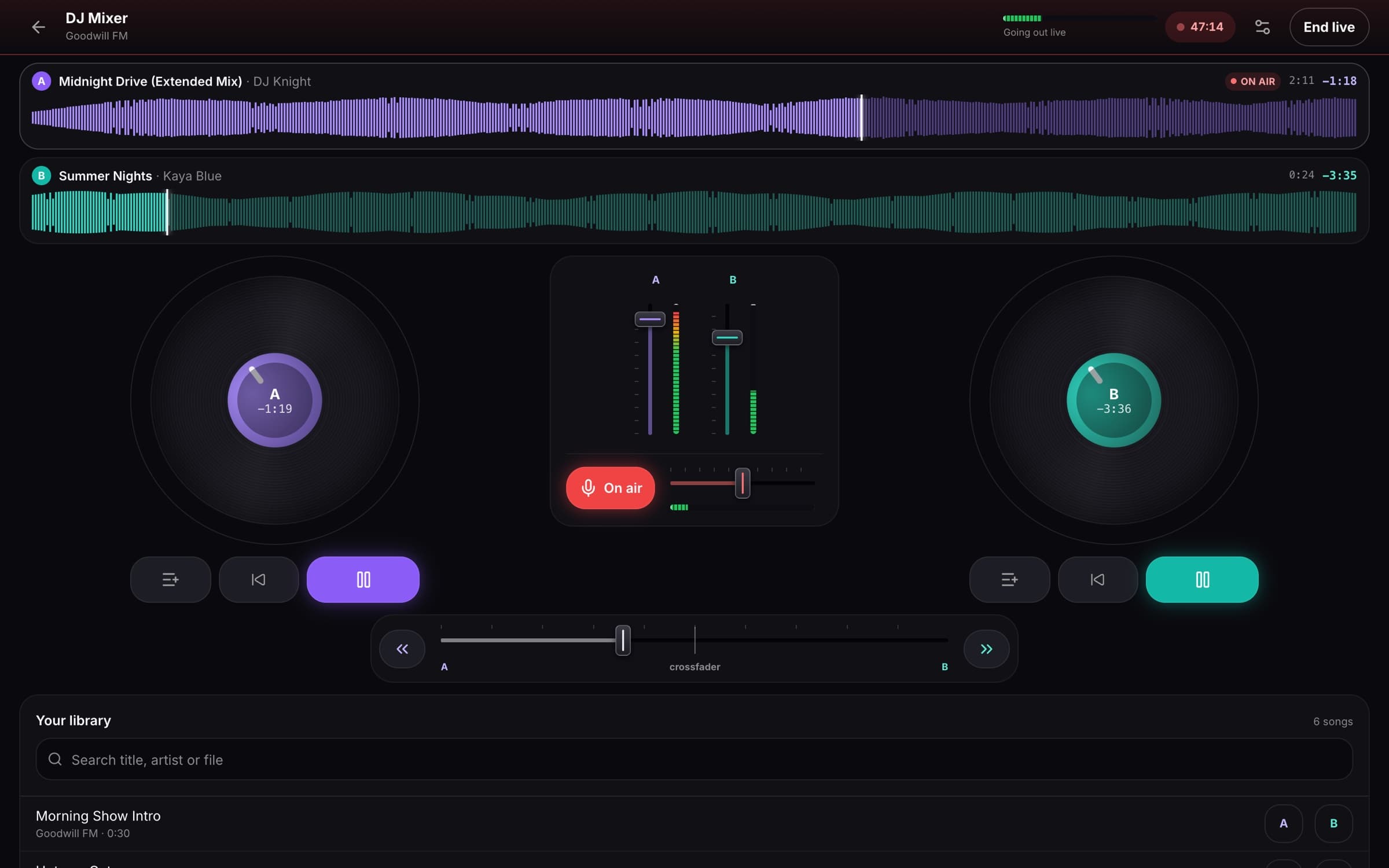
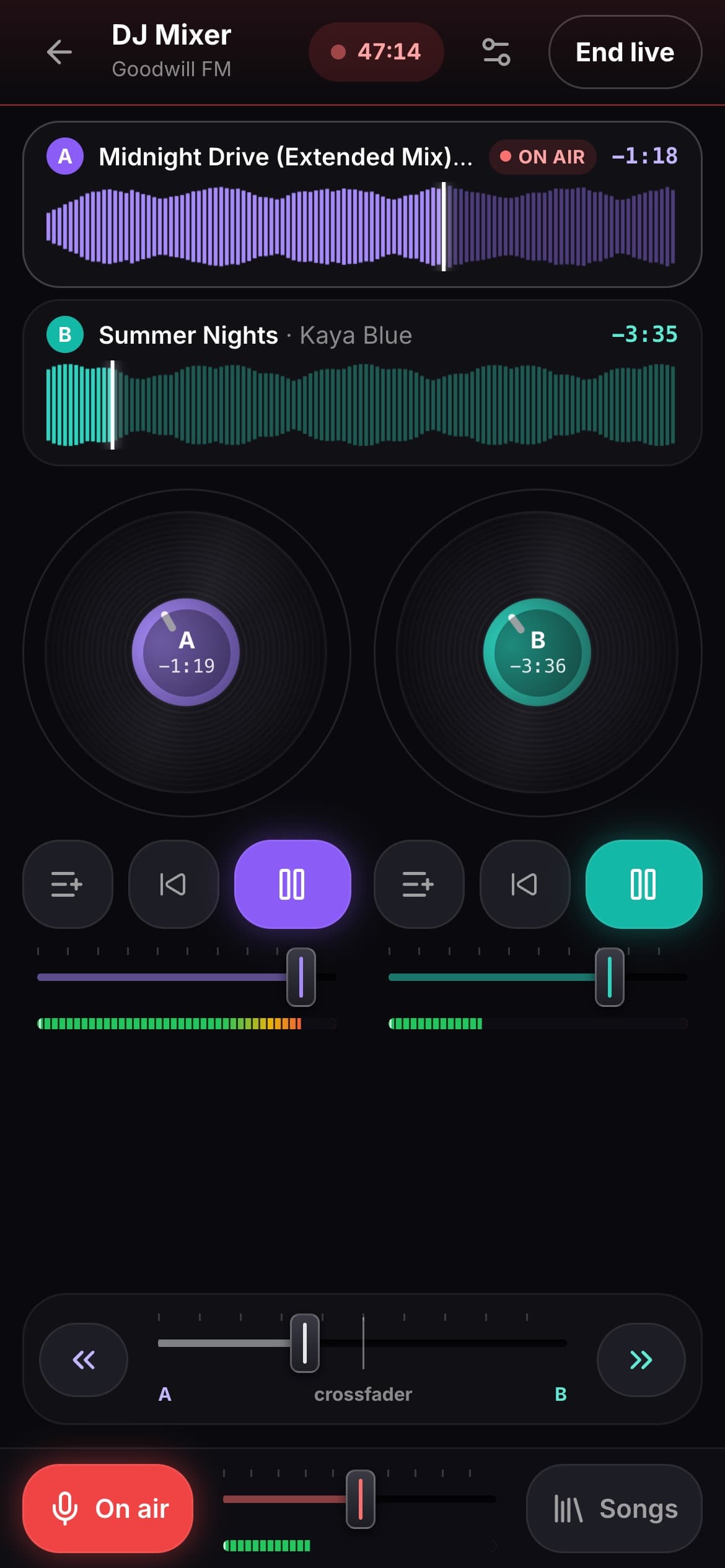
- Two decks
- Jog wheels
- Crossfader
- Six-second Fade
- Mic with auto-dip
- Full-track waveforms
What a set looks like
For DJs and hosts who play live. Here’s a set on air with the DJ Mixer, start to finish.
- 1Load up
Two songs, two decks
Pull a song from your library onto deck A and the next one onto deck B. Each deck shows the whole track’s waveform, so you can see the drop coming.
- 2Go live
You’re on air
Press Go live and your mix goes out on your station. The song on your louder deck shows as “now playing” for your listeners.
- 3Say hello
Talk over the intro
Switch your mic on and the music dips under your voice. Switch it off and the music comes straight back up.
- 4Mix
Blend into the next one
Ride the crossfader, or tap Fade for a smooth six-second mix. Touch the jog wheel to scratch, flick it back for a rewind.
- 5The crowd joins in
Tune-ins, tips, requests
People tune in while you play. Listeners can tip you and pay for requests, and the broadcaster app lets you feel every listener, heart and tip on your phone.
- 6Log off
The station keeps going
Stop whenever you like. AutoDJ picks up and keeps your station on air 24/7, and every track you played is logged for your royalty reports.
Phone or laptop. Nothing to install.
No controller needed. Open it in your browser and the decks are right there.
On your phone
Safari on iPhone or Chrome on Android. Touch the jog wheels to scratch, slide the crossfader with your thumb, and play a set from wherever you are.
- Both decks, the crossfader and your mic on one screen
- No app download, no controller
On your laptop
Any modern desktop browser. The full console on a big screen, with both waveforms side by side.
- Tap anywhere on a waveform to jump to that point
- Same console, same station, same listeners
Rather use your own software? Connect Virtual DJ, Mixxx, OBS or BUTT instead. Want a guest on the show? Co-host Live puts them on air from a link. More for DJs on Nobex for DJs.
Practise off air. Go live when it’s tight.
Nothing goes out until you press Go live, so rehearse your transitions as long as you like.
Open it and play
Load your songs, try the crossfader, scratch, nail the Fade. Every plan can open the DJ Mixer and practise off air.
Go live from the mixer
Going live from the DJ Mixer comes with Pro, $49/month, and with Business ($99) and Enterprise ($299).
On Starter ($29/month)? You can go live from your phone or browser mic, or from DJ software like Virtual DJ, Mixxx, OBS or BUTT.
Free to start — no card needed · On air in 5 minutesFrom $29/month · 7-day money-back guarantee · On air in 5 minutes
7 days free, then from $29/monthStarter $29/month · Pro $49/month · Cancel any time
From your library to live in three steps
Open the DJ Mixer
It’s in your dashboard. Open it on your phone or laptop and load songs from your station’s library onto deck A and deck B.
Practise off air
Try your transitions, scratches and mic breaks as long as you like. Nothing reaches your listeners until you go live.
Go live
Press Go live and your set is on your station. When you stop, AutoDJ takes over and keeps playing 24/7.
Everything on the console
What you can do while you’re live.
Two decks, one mix
Put any song from your library on deck A or B and blend them with the crossfader, or tap Fade for a smooth six-second mix.
Scratch and rewind
Touch the jog wheel to scratch, flick it back for a proper rewind, and let the record spin back up to speed.
Talk over the music
Switch your mic on and the music dips under your voice, then comes back up when you switch it off.
See every track
Each deck shows the whole song’s waveform. Tap anywhere on it to jump straight to the drop.
Now playing, logged
The song on your louder deck shows as “now playing” on your station, and every track you play is logged for your royalty reports.
Phone or laptop
Safari on iPhone, Chrome on Android, or any modern desktop browser. Nothing to install.
Bring your own music licence. DJ sets are commercial music, so the station needs its own licences for where it is heard (in the US: SoundExchange plus ASCAP, BMI, SESAC and GMR). We run the station and give you the royalty usage reports; we don’t sell licences.
Going live from the DJ Mixer comes with Pro ($49/month) and up. Every plan can open it and practise off air, and Starter can go live from your phone, your browser mic or your own DJ software.
Questions people ask first
- Do I need a DJ controller?
- No. Everything is on screen: two decks with jog wheels, the crossfader, Fade and your mic. On a phone you touch the jog wheels; on a laptop you use your mouse or trackpad.
- Phone or laptop: which should I use?
- Either. It runs in Safari on iPhone, Chrome on Android, or any modern desktop browser, with nothing to install. A laptop gives you the full console on a big screen; a phone lets you play a set from wherever you are.
- Which plan do I need?
- Going live from the DJ Mixer comes with Pro ($49/month), Business ($99) and Enterprise ($299). Every plan can open it and practise off air. On Starter ($29/month) you can still go live from your phone or browser mic, or from DJ software like Virtual DJ, Mixxx, OBS or BUTT.
- Can listeners tip me and request songs while I mix?
- Yes. Switch on tips and song requests in your dashboard and connect Stripe or PayPal once. Listeners tip or pay for a request from your player or station page while you’re live, and it goes to your own account. How earning works.
- Does my station keep playing when I stop?
- Yes. The moment you stop, AutoDJ picks up with your music and keeps your station on air 24 hours a day. Every track you played live is logged for your royalty reports.
- Can I use Virtual DJ or Mixxx instead?
- Yes, on every plan. Point Virtual DJ, Mixxx, OBS or BUTT at your station with the settings in your dashboard; here’s the step-by-step guide. That’s also the way to go if you want beat sync, effects or a headphone cue, which the DJ Mixer doesn’t have.
More you can do with Nobex
Co-host Live
Put any guest on air with a link, no app or account
Pro and up
Broadcaster app
Feel every listener, heart and tip on your phone
Every plan
AI shows
A radio show written and read by AI, in your voice
Pro and up
AI Promo Studio
Posts, videos and voice spots for your station
Every plan
Station website
A site with a player that keeps playing
Pro and up
Your own app
Your station’s app on iPhone and Android
Add-on, any plan
Earn from your station
Tips, memberships, song requests and sponsors
Every plan
Your next set starts in a browser tab.
Open the DJ Mixer, practise off air, and go live when it sounds right. When you log off, your station keeps playing.
Free to start — no card needed · On air in 5 minutesFrom $29/month · 7-day money-back guarantee · On air in 5 minutes
7 days free, then from $29/monthStarter $29/month · Pro $49/month · Cancel any time
Going live from the DJ Mixer comes with Pro, $49/month. Practise off air on any plan.