Your own app1 min read
Create your app in App Store Connect
The one Apple step only you can do. It takes a minute: press New App and copy the values from your checklist.
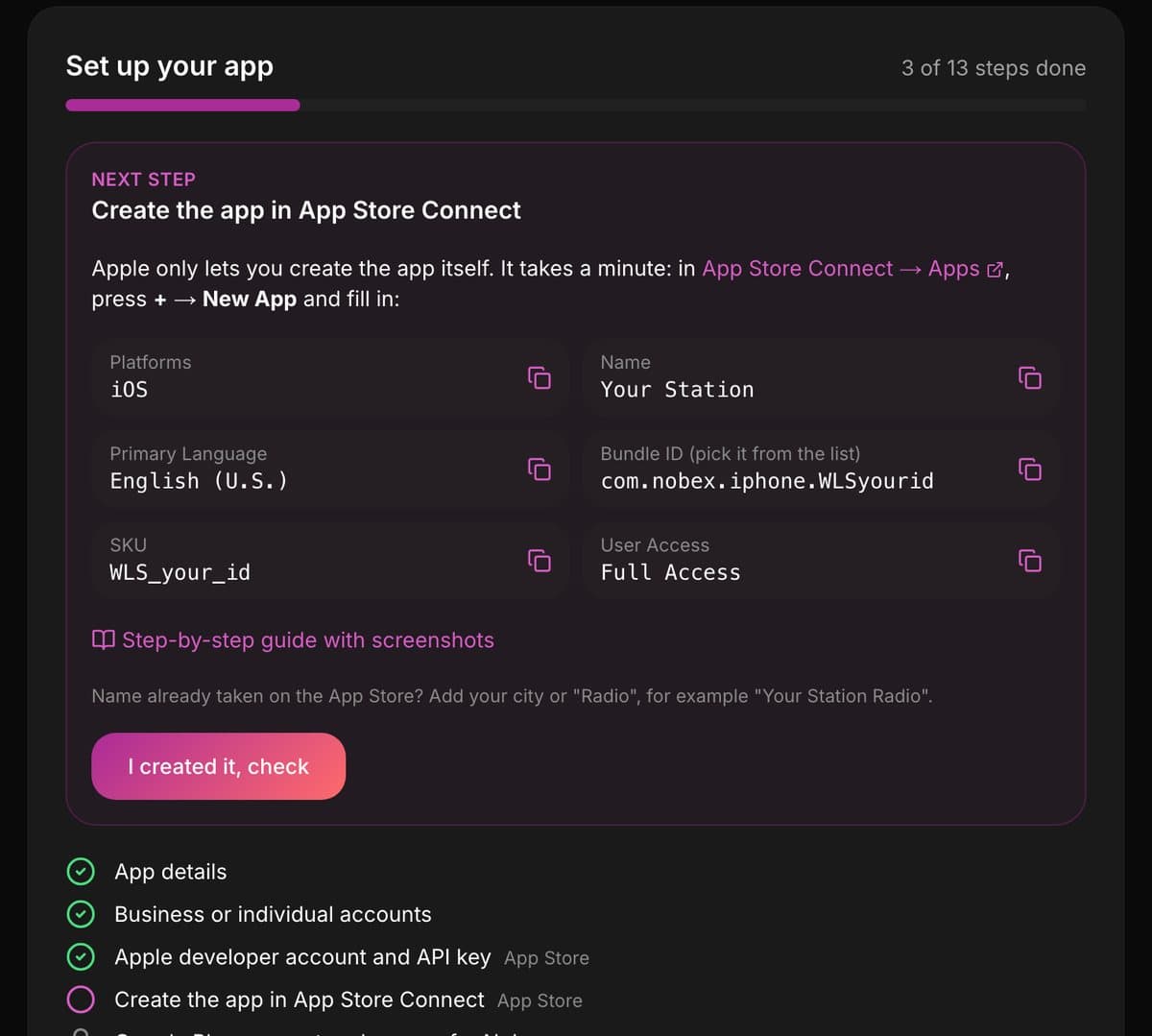
Apple does not let anyone else create the app, even with your key. Your checklist shows every value with a copy button.
- 1Open App Store Connect → Apps, press + and choose New App.
- 2Tick iOS.
- 3Copy in the Name, Primary Language and SKU from your checklist.
- 4Pick your Bundle ID from the list. We already registered it for you.
- 5Choose Full Access and press Create.
- 6Back on your checklist, press I created it, check.
Name already taken?
App Store names are unique. Add your city or the word Radio, for example “Your Station Miami”.
When the check passes, we set up TestFlight for you and add the account holder as a tester, so you can try your app before it goes public.
Keep reading
Set up your radio station app, step by stepWhat to do after you order your own app: the checklist, what each step needs, and a short guide with screenshots for every step.Publish your app as a business or as yourselfD-U-N-S number or not: what changes on the App Store and Google Play, so you can pick the right one.Create your App Store Connect API keyJoin the Apple Developer Program, create an API key, and upload it. We never need your Apple password or your SMS codes.Open a Google Play account and invite NobexOpen your developer account, invite the Nobex publishing account, and give us your Account ID.Create your app in Play Console and upload the first fileCreate the app with the package name we give you, and upload the first file. After that, we upload every version for you.Google Play’s 14-day test with 12 testersPersonal accounts only: what Google asks for before your app can go public, and how not to restart the clock.
Ready to put this into practice?
Start free and be on air in under five minutes — no software to install.Pick a plan and be on air in under five minutes — no software to install.
Start streaming freeStart streaming