
Set up your radio station app, step by step
What to do after you order your own app: the checklist, what each step needs, and a short guide with screenshots for every step.
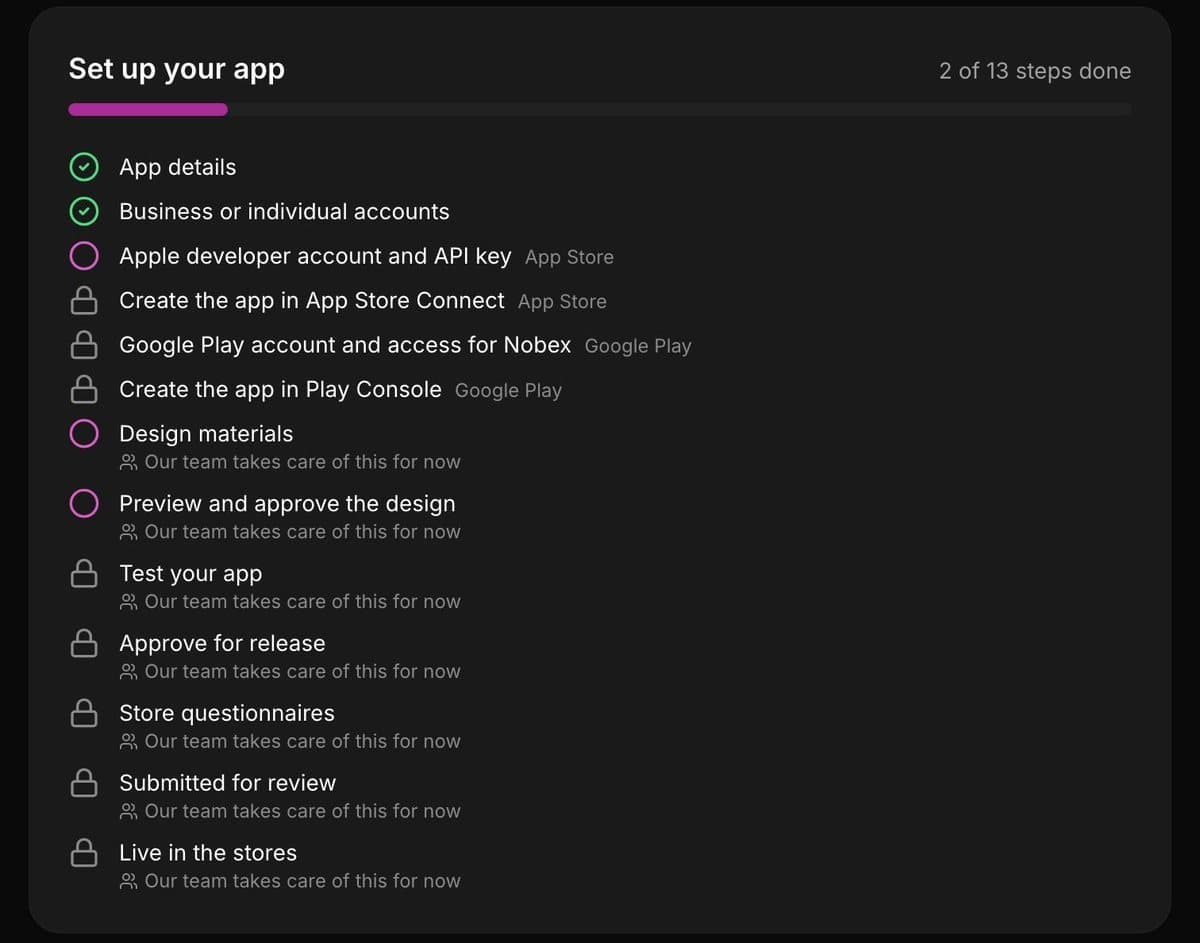
After you order your app, open your station → Grow → Your app. A checklist shows the next step. Do it, press the button, and we check it right away: the step completes, or we tell you exactly what is missing.
The steps you do
| Step | What you do | Guide |
|---|---|---|
| App details | A short subtitle, and which stores you want | On the page |
| Business or yourself | Choose how you appear in the stores | Choose |
| Apple key | Join Apple’s program, create a key, upload it | Apple key |
| Apple app | Create the app with the values we show | Create on Apple |
| Google access | Open a Play account and invite Nobex | Invite Nobex |
| Google app | Create the app and upload our first file | Create on Google |
Only want one store? Choose it in App details, and the other store’s steps disappear. Personal Google accounts also run a 14-day test with 12 people.
What Apple and Google charge
- Apple: $99 a year, paid to Apple.
- Google: $25 once, paid to Google.
The accounts are in your name, so the app stays yours.
What we do
The design, the build, your test versions, the store listing and sending it for review. The checklist marks these Our team takes care of this for now. Apple and Google then review your app, usually within days.
Keep reading
Ready to put this into practice?
Start free and be on air in under five minutes — no software to install.Pick a plan and be on air in under five minutes — no software to install.
Start streaming freeStart streaming